
Given a sorted array arr[] of n elements, write a function to search a given element x in arr[].
A simple approach is to do linear search. The time complexity of above algorithm is O(n). Another approach to perform the same task is using Binary Search.
Binary Search: Search a sorted array by repeatedly dividing the search interval in half. Begin with an interval covering the whole array. If the value of the search key is less than the item in the middle of the interval, narrow the interval to the lower half. Otherwise narrow it to the upper half. Repeatedly check until the value is found or the interval is empty.
BINARY_SEARCH(A, lower_bound, upper_bound, VAL)
- Compare x with the middle element.
- If x matches with the middle element, we return the mid index.
- Else if x is greater than the mid element, then x can only lie in the right (greater) half subarray after the mid element. Then we apply the algorithm again for the right half.
- Else if x is smaller, the target x must lie in the left (lower) half. So we apply the algorithm for the left half.
Example
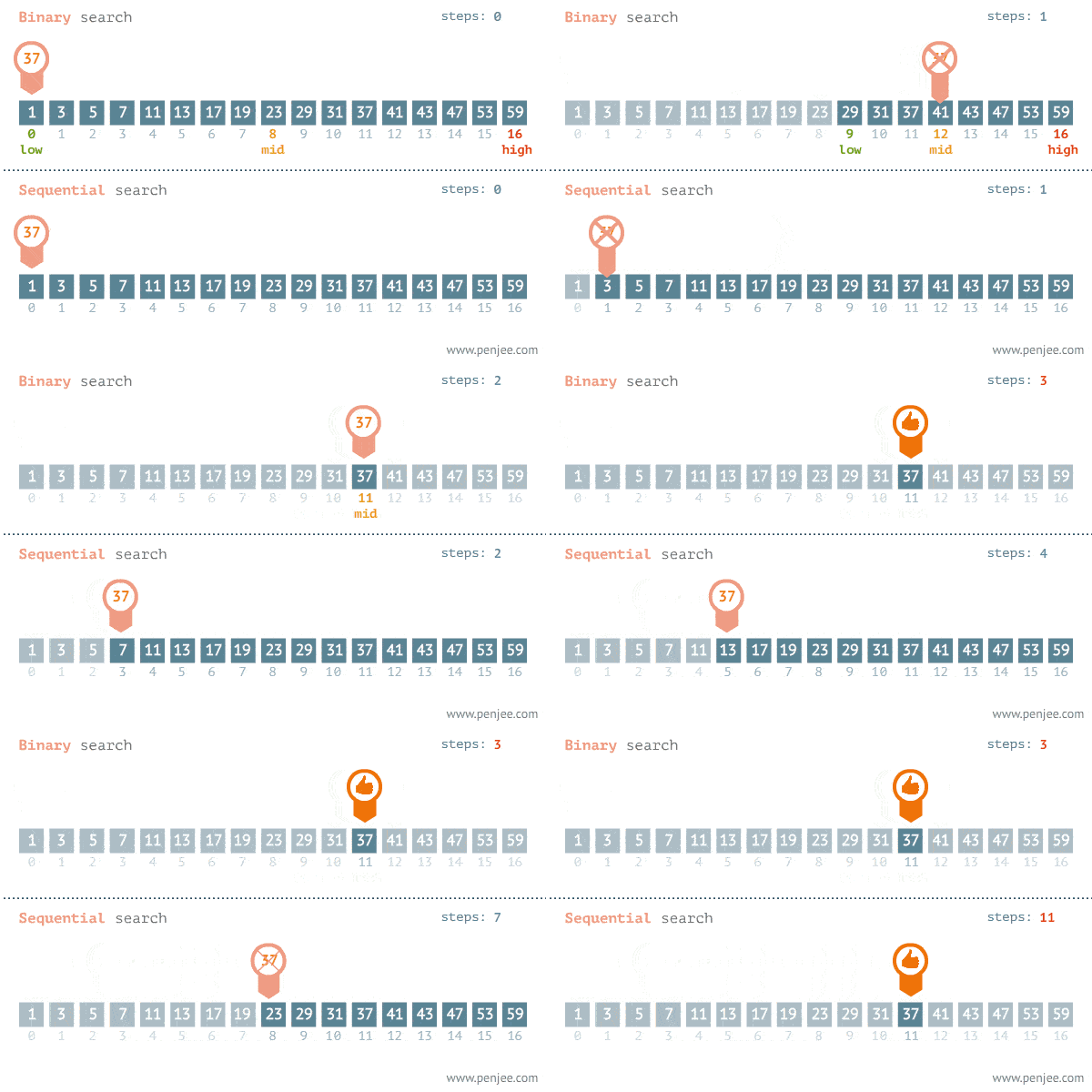
Binary Search Step-By-Step Process Breakdown:
In this step-by-step process, we’re going to be breaking down how to do a Binary Search on the following “exampleArray.” This is the same array from the gif in Step B.
let exampleArray = [1, 3, 5, 7, 11, 13, 17, 19, 23, 29, 31, 37, 41, 43, 47, 53, 59];
- We are going to need to keep track of the 3 following things as variables to perform a Binary Search: startIndex, middleIndex, and endIndex.
- startIndex will always be 0:
let startIndex = 0; - endIndex can always be calculated using array.length:
let endIndex = array.length — 1; - We want to get an inital middleIndex using the startIndex and endIndex, and the divide by 2. It can be a little tricky due to even or odd number of amount of elements in the array. We can use
Math.floor()to round down orMath.ceil()to round up, but we are going to round down withMath.floor()in our case:let middleIndex = Math.floor((startIndex + endIndex) / 2). This will be the only index variable that we store inside our While Loop. - Our while loop will then repeat the process until it ends. In our case, I have my example using
while(startIndex >= endIndex). - There are 16 total elements in the array, so let’s reacp. We divide by 2, round down with Math.floor(), in which picks a middleIndex at Index #8 where the number “23” is located. Using this number “23,” we now compare our target number “37” to identify which on is greater than or less than each other.
- If the middeIndex value is less than the target value of 37, we know that our target value will be somewhere to the right of the middleIndex. We can then assign our startIndex variable as the current middleIndex value, essentially chopping off the left half of the array. We also want to increment middleIndex by the count of 1 if our target number “37” > middleIndex “23.”
- If the middeIndex value is greater than the target value of 37, we know that our target value will be somewhere to the left of the middleIndex. We can then assign our endIndex variable as the current middleIndex value, essentially chopping off the right half of the array. We also want to Decrement middleIndex by the count of 1 if our target number “37” < middleIndex “23.”
- If the middleIndex value is equal to the target value of 37, we have found our target number “37.” The loop may only loop once or it may loop dozens of times, depending on your array size and what your target number is.
- Congratulations, you’ve completed your Binary Search!
Code Example
Let us consider an array arr = {1, 5, 7, 8, 13, 19, 20, 23, 29}. Find the location of the item 23 in the array.
In Recursive Method :
# Python 3 program for recursive binary search.
# Modifications needed for the older Python 2 are found in comments.

# Returns index of x in arr if present, else -1
def binary_search(arr, low, high, x):

    # Check base case
    if high >= low:

        mid = (high + low) // 2

        # If element is present at the middle itself
        if arr[mid] == x:
            return mid

        # If element is smaller than mid, then it can only
        # be present in left subarray
        elif arr[mid] > x:
            return binary_search(arr, low, mid - 1, x)

        # Else the element can only be present in right subarray
        else:
            return binary_search(arr, mid + 1, high, x)

    else:
        # Element is not present in the array
        return -1

# Test array
arr = [ 1, 5, 7, 8, 13, 19, 20, 23, 29 ]
x = 23

# Function call
result = binary_search(arr, 0, len(arr)-1, x)

if result != -1:
    print("Element is present at index", str(result))
else:
    print("Element is not present in array")
In Iterative Method:
# Iterative Binary Search Function
# It returns index of x in given array arr if present,
# else returns -1
def binary_search(arr, x):
    low = 0
    high = len(arr) - 1
    mid = 0

    while low <= high:

        mid = (high + low) // 2

        # If x is greater, ignore left half
        if arr[mid] < x:
            low = mid + 1

        # If x is smaller, ignore right half
        elif arr[mid] > x:
            high = mid - 1

        # means x is present at mid
        else:
            return mid

    # If we reach here, then the element was not present
    return -1


# Test array
arr = [ 1, 5, 7, 8, 13, 19, 20, 23, 29 ]
x = 23

# Function call
result = binary_search(arr, x)

if result != -1:
    print("Element is present at index", str(result))
else:
    print("Element is not present in array")
Hope the article will help.
