

.NET is a framework to develop software applications. It is designed and developed by Microsoft and the first beta version released in 2000.
It is used to develop applications for the Web, Windows, phone. Moreover, it provides a broad range of functionalities and support.
This framework contains a large number of class libraries known as Framework Class Library (FCL). The software programs written in .NET are executed in the execution environment, which is called CLR (Common Language Runtime). These are the core and essential parts of the .NET framework.
This framework provides various services like memory management, networking, security, memory management, and type-safety.
Definition: A programming infrastructure created by Microsoft for building, deploying, and running applications and services that use .NET technologies, such as desktop applications and Web services.
Cross-Language integration
You can use a utility of a language in another language (It uses Class Language Integration).
.NET Framework includes no restriction on the type of applications that are possible. The .NET Framework allows the creation of Windows applications, Web applications, Web services, and a lot more.
The .NET Framework has been designed so that it can be used from any language, including C#, C++, Visual Basic, JScript, and even older languages such as COBOL.
The reason for this .NET was that the version information about the different components of an application was not recorded by the system. (Windows Registry cannot support the multiple versions of the same COM component this is called the DLL hell problem.)
.NETFramework provides operating systems with a Global Assembly Cache (GAC). This Cache is a repository for all the .Net components that are shared globally on a particular machine. When a .Net component is installed onto the machine, the Global Assembly Cache looks at its version, its public key, and its language information and creates a strong name for the component. The component is then registered in the repository and indexed by its strong name, so there is no confusion between different versions of the same component, or DLL.
Components of .NET Framework Architecture
The architecture of the .NET framework is based on the .NET component.
The two major components of the .NET Framework are the Common Language Runtime and the .NET Framework Class Library.
- The Common Language Runtime (CLR) is the execution engine that handles running applications. It provides services like thread management, garbage collection, type-safety, exception handling, and more.
- The Class Library provides a set of APIs and types for common functionality. It provides types for strings, dates, numbers, etc. The Class Library includes APIs for reading and writing files, connecting to databases, drawing, and more.
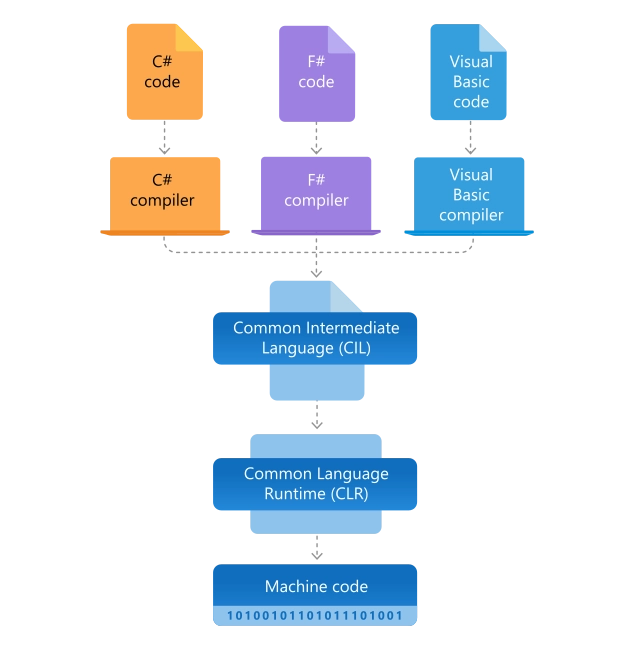
NET applications are written in the C#, F#, or Visual Basic programming language. Code is compiled into a language-agnostic Common Intermediate Language (CIL). Compiled code is stored in assemblies—files with a .dll or .exe file extension.
When an app runs, the CLR takes the assembly and uses a just-in-time compiler (JIT) to turn it into machine code that can execute on the specific architecture of the computer it is running on.
CLR (Common Language Runtime)
It is a program execution engine that loads and executes the program. It converts the program into native code. It acts as an interface between the framework and operating system. It does exception handling, memory management, and garbage collection. Moreover, it provides security, type-safety, interoperability, and portability. A list of CLR components are given below:
FCL (Framework Class Library)
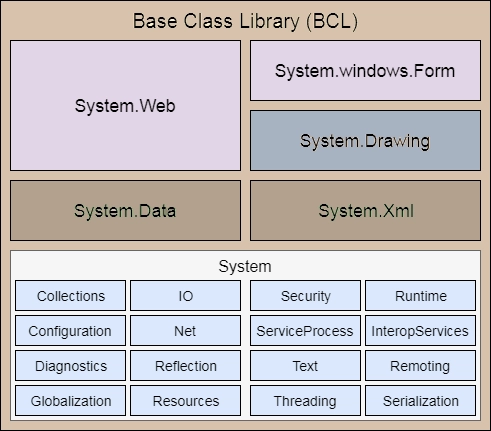
It is a standard library that is a collection of thousands of classes and used to build an application. The BCL (Base Class Library) is the core of the FCL and provides basic functionalities.
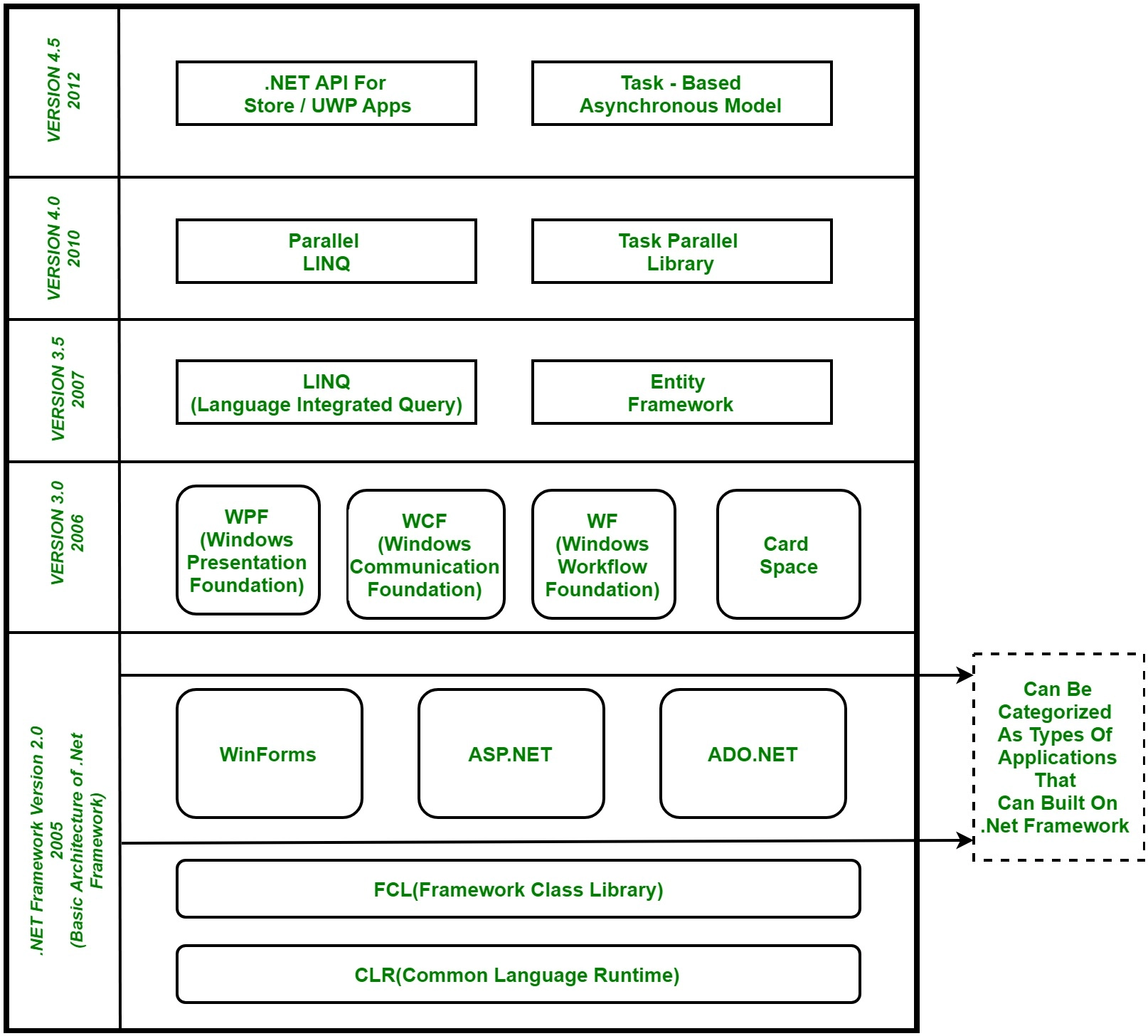
WinForms
Windows Forms is a smart client technology for the .NET Framework, a set of managed libraries that simplify common application tasks such as reading and writing to the file system.
ASP.NET
ASP.NET is a web framework designed and developed by Microsoft. It is used to develop websites, web applications, and web services. It provides a fantastic integration of HTML, CSS, and JavaScript. It was first released in January 2002.
ADO.NET
ADO.NET is a module of .Net Framework, which is used to establish a connection between application and data sources. Data sources can be such as SQL Server and XML. ADO .NET consists of classes that can be used to connect, retrieve, insert, and delete data.
WPF (Windows Presentation Foundation)
Windows Presentation Foundation (WPF) is a graphical subsystem by Microsoft for rendering user interfaces in Windows-based applications. WPF, previously known as “Avalon”, was initially released as part of .NET Framework 3.0 in 2006. WPF uses DirectX.
WCF (Windows Communication Foundation)
It is a framework for building service-oriented applications. Using WCF, you can send data as asynchronous messages from one service endpoint to another.
WF (Workflow Foundation)
Windows Workflow Foundation (WF) is a Microsoft technology that provides an API, an in-process workflow engine, and a re-hostable designer to implement long-running processes as workflows within .NET applications.
LINQ (Language Integrated Query)
It is a query language, introduced in .NET 3.5 framework. It is used to make the query for data sources with C# or Visual Basics programming languages.
Entity Framework
It is an ORM-based open-source framework that is used to work with a database using .NET objects. It eliminates a lot of developers’ effort to handle the database. It is Microsoft’s recommended technology to deal with the database.
Parallel LINQ
Parallel LINQ or PLINQ is a parallel implementation of LINQ to objects. It combines the simplicity and readability of LINQ and provides the power of parallel programming.
It can improve and provide fast speed to execute the LINQ query by using all available computer capabilities.
Apart from the above features and libraries, .NET includes other APIs and Models to improve and enhance the .NET framework.
In 2015, Task Parallel and Task parallel libraries were added. In .NET 4.5, a task-based asynchronous model was added.
Architecture of CLR
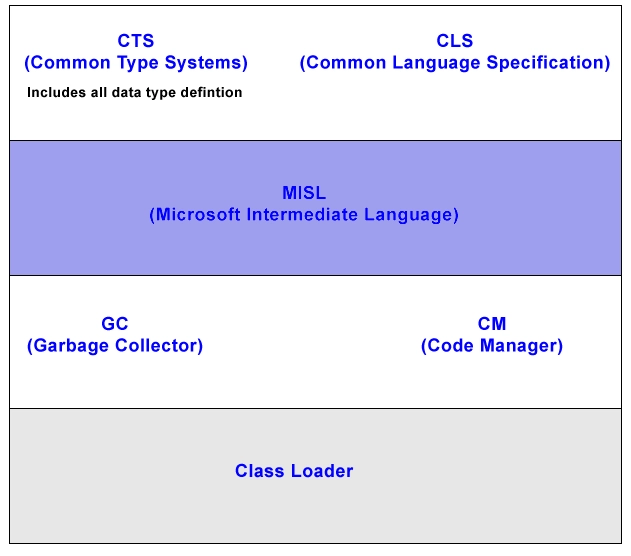
CLS (Common Language Specification)
It is a subset of CTS. All instruction is in CLS i.e. instruction of CTS is written in CLS.
Code Manager
Code manager invokes class loader for execution.
.NET supports two kinds of coding
- Managed Code
- Unmanaged Code
Managed Code
The resource, which is within your application domain is managed code. The resources that are within a domain are faster.
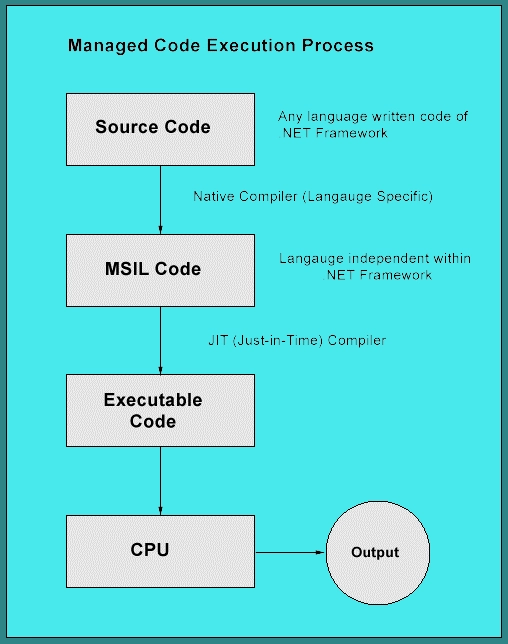
The code, which is developed in .NET framework, is known as managed code. This code is directly executed by CLR with help of managed code execution. Any language that is written in .NET Framework is managed code.
Managed code uses CLR which in turn looks after your applications by managing memory, handling security, allowing cross-language debugging, and so on.
Unmanaged Code
The code, which is developed outside .NET, Framework is known as unmanaged code.
Applications that do not run under the control of the CLR are said to be unmanaged, and certain languages such as C++ can be used to write such applications, which, for example, access low-level functions of the operating system. Background compatibility with the code of VB, ASP, and COM are examples of unmanaged code.
Unmanaged code can be unmanaged source code and unmanaged compile code.
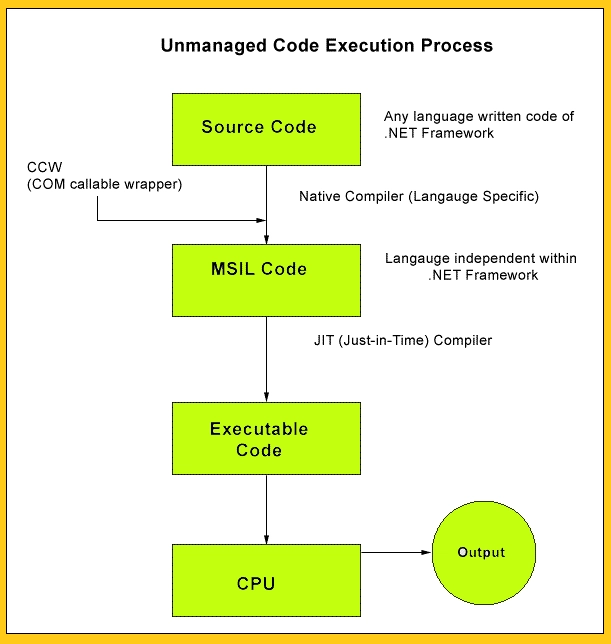
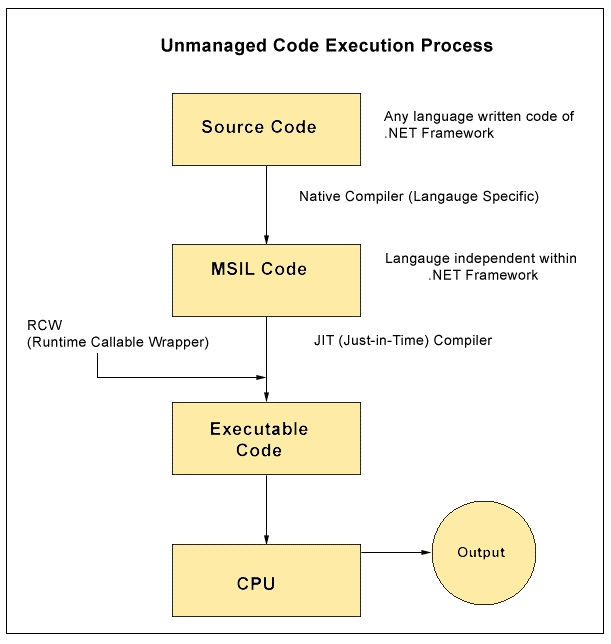
Unmanaged code is executed with help of wrapper classes.
Wrapper classes are of two types: CCW (COM callable wrapper) and RCW (Runtime Callable Wrapper).
The wrapper is used to cover differences with the help of CCW and RCW.
COM callable wrapper unmanaged code
Runtime Callable Wrapper unmanaged code
Native Code
The code to be executed must be converted into a language that the target operating system understands, known as native code. This conversion is called compiling code, an act that is performed by a compiler.
Under the .NET Framework, however, this is a two-stage process. With help of MSIL and JIT.
MSIL (Microsoft Intermediate Language)
It is a language-independent code. When you compile code that uses the .NET Framework library, you don’t immediately create operating system-specific native code.
Instead, you compile your code into Microsoft Intermediate Language (MSIL) code. The MSIL code is not specific to any operating system or to any language.
JIT (Just-in-Time)
Just-in-Time (JIT) compiler, which compiles MSIL into native code that is specific to the OS and machine architecture being targeted. Only at this point can the OS execute the application. The just-in-time part of the name reflects the fact that MSIL code is only compiled as, and when, it is needed.
In the past, it was often necessary to compile your code into several applications, each of which targeted a specific operating system and CPU architecture. Often, this was a form of optimization.
This is now unnecessary because JIT compilers (as their name suggests) use MSIL code, which is independent of the machine, operating system, and CPU. Several JIT compilers exist, each targeting a different architecture, and the appropriate one will be used to create the native code required.
The beauty of all this is that it requires a lot less work on your part – in fact, you can forget about system-dependent details and concentrate on the more interesting functionality of your code.
JIT is of three types:
- Pre JIT
- Econo JIT
- Normal JIT
Pre JIT
It converts all the code into executable code and it is slow
Econo JIT
It will convert the called executable code only. But it will convert code every time when a code is called again.
Normal JIT
It will only convert the called code and will store in cache so that it will not require converting code again. Normal JIT is fast.
Assemblies
When you compile an application, the MSIL code created is stored in an assembly. Assemblies include both executable application files that you can run directly from Windows without the need for any other programs (these have a .exe file extension), and libraries (which have a .dll extension) for use by other applications.
In addition to containing MSIL, assemblies also include meta-information (that is, information about the information contained in the assembly, also known as metadata) and optional resources (additional data used by the MSIL, such as sound files and pictures).
The meta-information enables assemblies to be fully self-descriptive. You need no other information to use an assembly, meaning you avoid situations such as failing to add required data to the system registry and so on, which was often a problem when developing with other platforms.
This means that deploying applications is often as simple as copying the files into a directory on a remote computer. Because no additional information is required on the target systems, you can just run an executable file from this directory, and (assuming the .NET CLR is installed) you’re good to go.
Of course, you won’t necessarily want to include everything required to run an application in one place. You might write some code that performs tasks required by multiple applications. In situations like that, it is often useful to place the reusable code in a place accessible to all applications. In the .NET Framework, this is the Global Assembly Cache (GAC). Placing code in the GAC is simple – you just place the assembly containing the code in the directory containing this cache.
Garbage Collection (GC)
One of the most important features of managed code is the concept of garbage collection. This is the .NET method of making sure that the memory used by an application is freed up completely when the application is no longer in use.
Prior to .NET this was mostly the responsibility of programmers, and a few simple errors in code could result in large blocks of memory mysteriously disappearing as a result of being allocated to the wrong place in memory. That usually meant a progressive slowdown of your computer followed by a system crash.
.NET garbage collection works by inspecting the memory of your computer every so often and removing anything from it that is no longer needed. There is no set time frame for this; it might happen thousands of times a second, once every few seconds, or whenever, but you can rest assured that it will happen.
Will try to explain the processing in terms of C# code which is written using .NET Framework.
Step 1- Application code is written using a .NET – compatible language C#.
Step 2 – Code is compiled into MSIL, which is stored in an assembly
Step 3 – When this code is executed (either in its own right if it is an executable or when it is used from other code), it must first be compiled into native code using a JIT compiler.
Step 4 – The native code is executed in the context of the managed CLR, along with any other running applications or processes.
Note: One additional point concerning this process. The C# code that compiles into MSIL in step 2 needn’t be contained in a single file. It’s possible to split application code across multiple source code files, which are then compiled together into a single assembly. This extremely useful process is known as linking.
This is because it is far easier to work with several smaller files than one enormous one. You can separate out logically related code into an individual file so that it can be worked on independently and then practically forgotten about when completed.
This also makes it easy to locate specific pieces of code when you need them and enables teams of developers to divide up the programming burden into manageable chunks, whereby individuals can check out pieces of code to work on without risking damage to otherwise satisfactory sections or sections other people are working on.
